Silver Palace beta: Dichotomy is over, sign up for Retrace
Looking for the current Silver Palace beta? Sign up for Dichotomy: Retrace here. The Dichotomy beta below ended on August 13, 2026. The third test runs on Android, iOS and PC, and sign-ups close on October 10, 2026 at 18:00 (UTC+8), which is 12:00 CEST. Dichotomy testers who qualified must submit the new survey too. There is no public client to download; selected testers are notified after recruitment closes. What the announcement says.
The Silver Palace "Dichotomy" Beta Test pre-download opened to selected Detectives ahead of a test that ran from July 23, 2026 at 10:00 to August 13, 2026 at 10:00 (UTC+8). This page is the record of that test: how access was checked, how the client was installed, and what went wrong. For the current position, see Silver Palace download and the Silver Palace beta test tracker.
Quick version, as it worked for Dichotomy: testers first confirmed access on the official Check Test Access page with the email address used in the recruitment survey. Selected players then used a PC web browser to pre-download the Windows-only client, and test access bound to whichever PC they logged in on first. Retrace keeps that device rule.
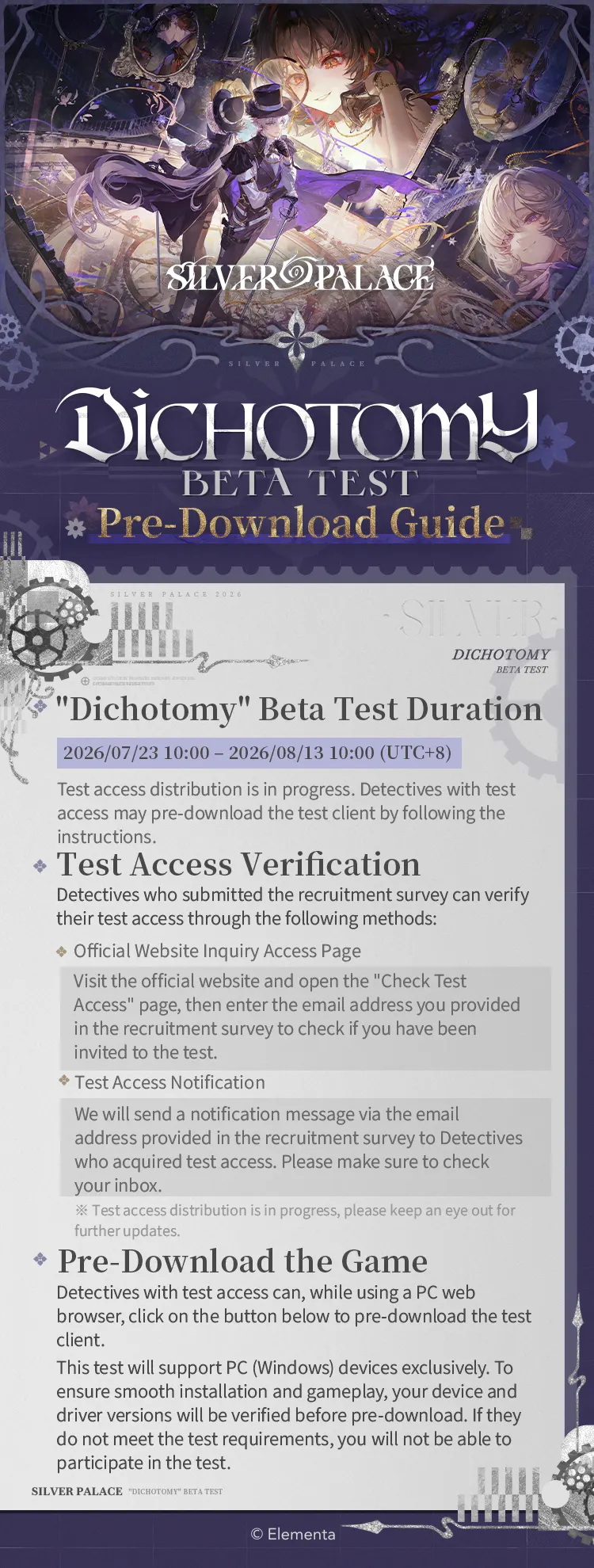
Dichotomy Beta Test dates
- Pre-download: Opened before the test for players with confirmed access.
- Test begins: July 23, 2026, 10:00 (UTC+8).
- Test ends: August 13, 2026, 10:00 (UTC+8).
If you applied during recruitment, use the official Check Test Access page to check eligibility. Enter the email address submitted in the recruitment survey. Selected players will also receive an access notification at that address; check spam and Promotions folders as well.
How to pre-download the Silver Palace Dichotomy Beta
- Confirm that your test access is active on the official access-check page.
- On a PC web browser, select the pre-download button and follow the launcher instructions.
- Allow the launcher to verify your device and driver versions before downloading. A device that does not meet the test requirements cannot join.
- Install the client on an SSD, then launch and log in only on the device you plan to use for the test.
The Dichotomy test supports Windows PCs only. There is no mobile or console client for this test.
PC system requirements
| Component | Minimum | Recommended |
|---|---|---|
| Operating system | Windows 10 22H2 or Windows 11 21H2, or later | Same |
| CPU | Intel Core i7-8700 / AMD Ryzen 5 3600, or equivalent | Intel Core i7-12700 / AMD Ryzen 7 5800X, or above |
| GPU | NVIDIA GeForce GTX 1060 6 GB / AMD Radeon RX 580 8 GB, or equivalent | NVIDIA GeForce RTX 3060 / AMD Radeon RX 6600 XT, or above |
| VRAM | 6 GB | 8 GB or higher |
| RAM | 12 GB | 16 GB or higher |
| Storage | 65 GB available SSD space, plus 25 GB during extraction | Same |
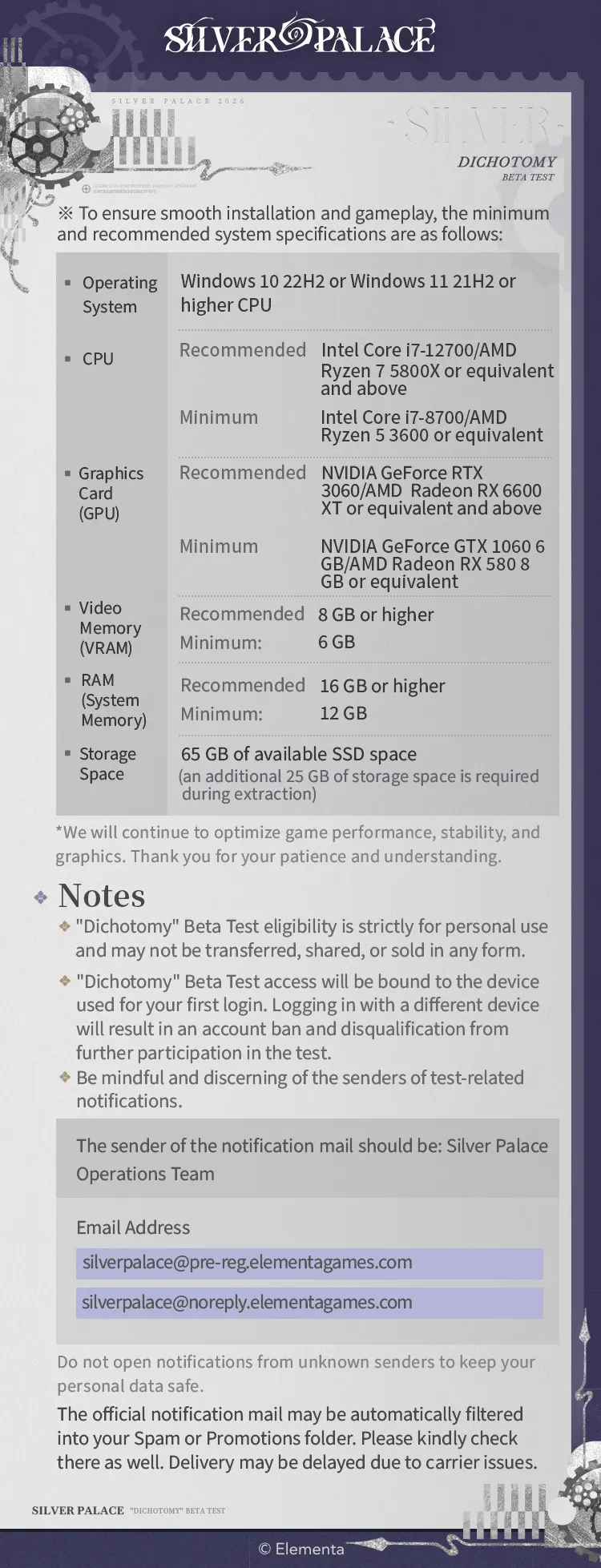
The temporary extraction space matters: reserve 90 GB free on an SSD before starting, even though the installed game requires 65 GB. The team says performance, stability, and graphics optimization are ongoing during the beta. For the earlier recruitment and test context, see our Dichotomy Beta registration update.
Important access and security rules
- Do not share, transfer, or sell access. Eligibility is personal and cannot be transferred in any form.
- Your first-login PC is permanent for this test. Signing in from a different device afterward can lead to an account ban and removal from the test.
- Use only official notification emails. Silver Palace Operations Team notifications may come from
silverpalace@pre-reg.elementagames.comorsilverpalace@noreply.elementagames.com. Be cautious with messages from any other sender. - Check filtered folders. Official mail can arrive in Spam or Promotions, and delivery may be delayed by the email provider.
Customer support and installation checks
If you need help, open the launcher and choose the Customer Support icon to submit a request to the Silver Palace Customer Service Center. You can also contact service_global@elementagames.com.
If the launcher says the selected installation location is on an HDD, it is recommending an SSD for better performance. Select an SSD installation path instead. If you see "Device Check Failed" at startup, compare the logged-in PC with the published minimum and recommended requirements. The launcher has a Copy Device Specs option in the warning window; copy those details, then submit them through Customer Support.
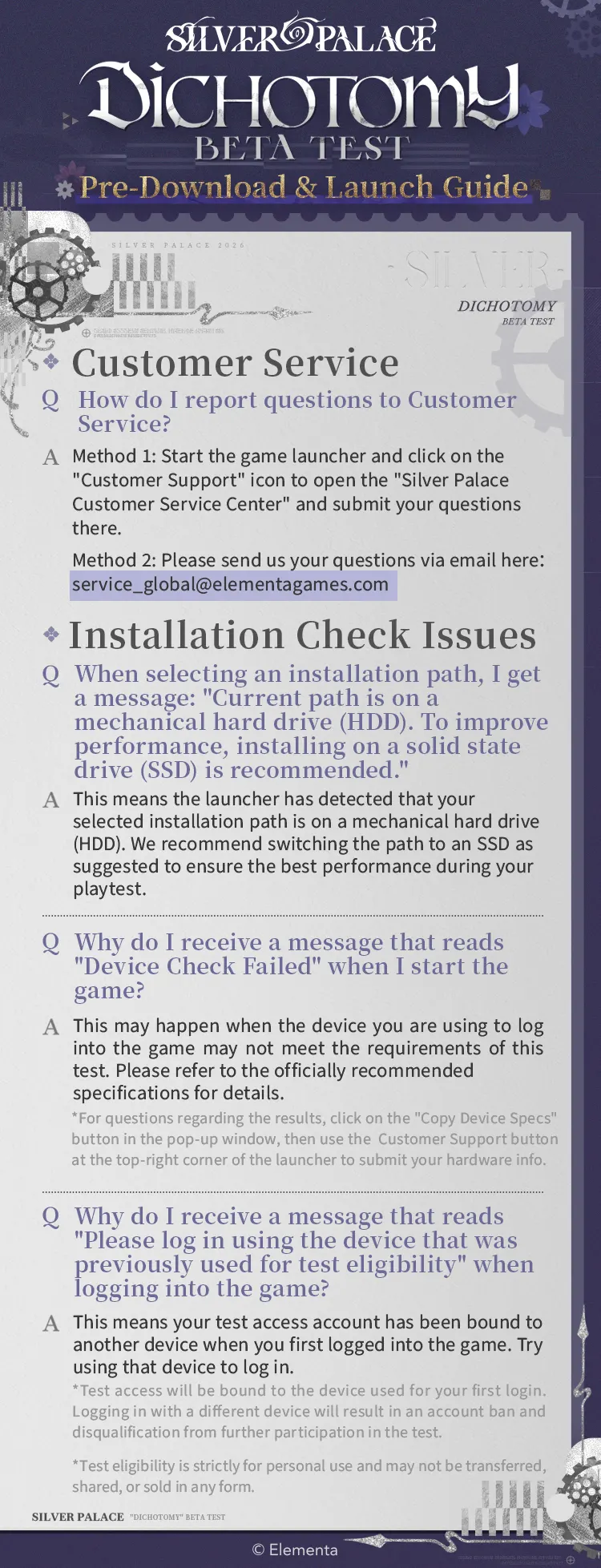
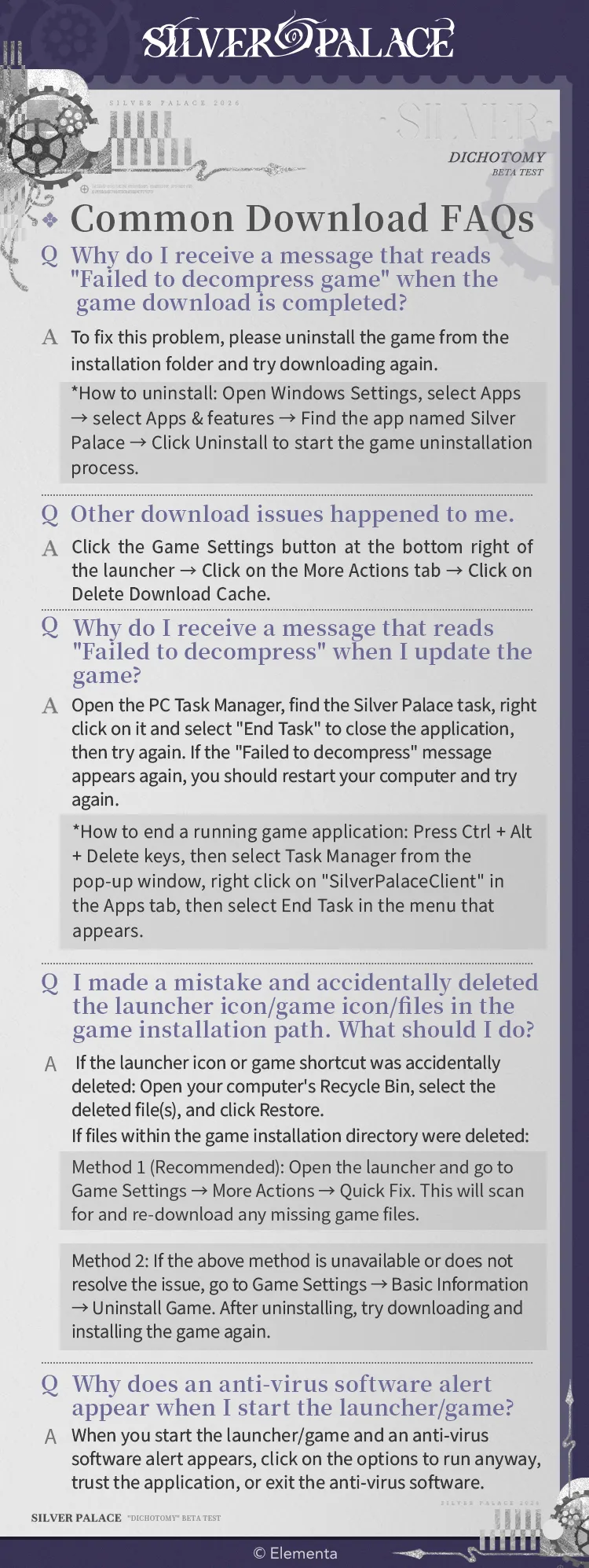
Common download and launcher fixes
"Failed to decompress game" after downloading
Uninstall the game and download it again. In Windows, go to Settings → Apps → Apps & features, find Silver Palace, and select Uninstall before retrying.
Other download issues
In the launcher, open Game Settings → More Actions → Delete Download Cache, then try the download again.
"Failed to decompress" during an update
Open Task Manager, find the Silver Palace task, and choose End Task. Retry the update; if the error returns, restart the PC first.
A launcher shortcut or game file was deleted
Restore a deleted shortcut from the Recycle Bin. For deleted files inside the installation folder, open Game Settings → More Actions → Quick Fix to scan for and re-download missing files. If that does not work, open Game Settings → Basic Information → Uninstall Game, then install the game again.
Antivirus warning when starting the launcher or game
Only after confirming you installed the legitimate client from the official page, use your antivirus software's available option to allow or trust the application. Do not disable security protections for files from unknown sources.
FAQ
When does the Silver Palace Dichotomy Beta Test run?
The test runs from July 23, 2026 at 10:00 until August 13, 2026 at 10:00 (UTC+8).
How do I check whether I have beta access?
Go to the official Check Test Access page and enter the email address you used for the recruitment survey. Selected players may also be notified by email.
What platforms are supported?
The Dichotomy Beta Test is for PC (Windows) only.
Can I use a different PC after my first login?
No. Test access is tied to the device used for the first login. Logging in on another device may result in an account ban and disqualification.
How much storage does the beta need?
You need 65 GB of available SSD space for the game, plus an additional 25 GB during extraction.
What is the official Silver Palace beta support email?
For customer service questions, contact service_global@elementagames.com. Only treat messages from the listed Silver Palace Operations Team addresses as official access notifications.
Know someone tracking Silver Palace? Send them this.
About the Author
Silver Palace Meta Team
Silver Palace Meta Team
We're dedicated to providing comprehensive coverage of Silver Palace news, updates, and community insights.